
By Benoit Descary · September 8, 2026 · Guide
Mealime Is Shutting Down: What to Do Before October 21, and the Best Alternative
Mealime is shutting down, and the date is set: October 21, 2026. You can keep using the app until then; after that it goes dark and every bit of personal data gets erased. If you are looking for a Mealime alternative, Olivi is the closest match: a Canadian meal planner as well, designed in Montréal, that plans your week with AI from your own tastes and recipes, builds an aisle-sorted grocery list automatically and works on the web, iPhone and Android. This guide compares the two apps feature by feature and shows how to save your Mealime recipes before the deadline.
Update, September 15, 2026
- The date holds: Mealime will stop working on October 21, 2026, as its closing page still says.
- Recipes from the Mealime catalogue stay available in Meals Hub, but your account does not move over, so you set your preferences up again there.
- All personal data is deleted at shutdown, and Mealime’s closing page offers no tool to export your favourites or your plans.
- That leaves about five weeks. It is a good moment to set your favourite recipes aside, with the method below.
What happens on October 21
Mealime’s own closing page (mealime.com/closing) gives the date: October 21, 2026. On that day the app stops working and all personal data is deleted. Until then, you can keep using it as usual. The closing page offers no way to export your plans or your favourite recipes, so whatever matters to you needs saving on your side before the date.
Why? Mealime has belonged to Albertsons Companies, one of the largest grocery groups in the United States, since 2021, and the group is folding its recipes and planning tools into “Meals Hub”, which lives inside its store apps and websites. According to Mealime, you can use Meals Hub even without one of its stores nearby, to browse recipes, build a plan and make a list. But you go through an American grocery chain’s account, set your preferences up again and leave your Mealime account behind. If you shop in Canada, the UK or Australia, that is quite a detour.
Two Canadian apps, two eras
Mealime was founded in Vancouver in 2013 by Maria Golikova and Jeffrey Bunn. The idea was simple and good: recipes ready in about 30 minutes, a personalized plan based on your dietary preferences, and a grocery list sorted by category. More than four million people signed up, many of them in Canada and the United States.
Olivi picks up the torch on the other side of the country. Designed in Montréal by Tangram HQ Studio, it starts from the same need, taking the chore out of “what are we eating this week?”, with today’s tools: Olive, an AI assistant that composes your weekly meal plan from your tastes, your budget and your own recipes, and a grocery list that builds itself, sorted by aisle and shared in real time. Data stays hosted in Canada.
Mealime vs Olivi: feature comparison
Here is what Mealime did well, and what Olivi does instead, often going a step further:
- Weekly plan. Mealime: you pick recipes from its catalogue using your filters. Olivi: Olive generates the whole week from your profile (allergies, diet, budget, time available), you swap a meal in one tap, and you can plan up to four weeks at once.
- Your own recipes. Mealime built its plans from its own catalogue; your family recipes were not the starting point. Olivi imports a recipe from any website, a PDF or a photo, deciphers a handwritten card and accepts a Paprika export. Your recipes become the base of your plan.
- Grocery list. Both generate it automatically by aisle. Olivi adds a list shared in real time through a simple link (the person doing the shopping needs no account), a one-handed shopping mode for the store, and autocomplete with the products of your country.
- Hands-free cooking mode. Mealime had it, Olivi does too: the screen stays on, steps show up large, timers are built in, and Olive answers your questions while you cook.
- Batch cooking. Not in Mealime. Olivi merges several recipes into one batch cooking walkthrough with its timers: one afternoon, a week of meals.
- Nutrition. Mealime showed it, but it disappears with the app on October 21. Olivi shows nutrition facts per serving for every recipe, calculated from Health Canada’s official nutrient file, never made up.
- Language. Mealime was English only. Olivi is available in English (Canada, United States, United Kingdom, Australia), French, Spanish, German, Italian and Dutch, with the products and units of your country.
- Platforms. Mealime: iPhone and Android. Olivi: web app (olivi.ca), iPhone and iPad, and Android, all synced automatically.
- Video recipes. Not in Mealime. Paste a TikTok or YouTube link and Olivi turns the video into a complete recipe card, with the photo, the creator’s name and a link back to the original video.
How to save your Mealime recipes before October 21
Mealime offers no export, but you can rescue what matters in an evening. Here is the method we recommend, ideally done by October 20:
- 1. Open Mealime and write down the recipes you want to keep: your favourites and the dishes you make on autopilot.
- 2. For every recipe that comes from a website, find the original address. You can paste all of those addresses at once into the import for several recipes: Olivi reads each link as a regular import, and you pick what to keep before anything is saved. The details are in the help article on moving your recipes from another app.
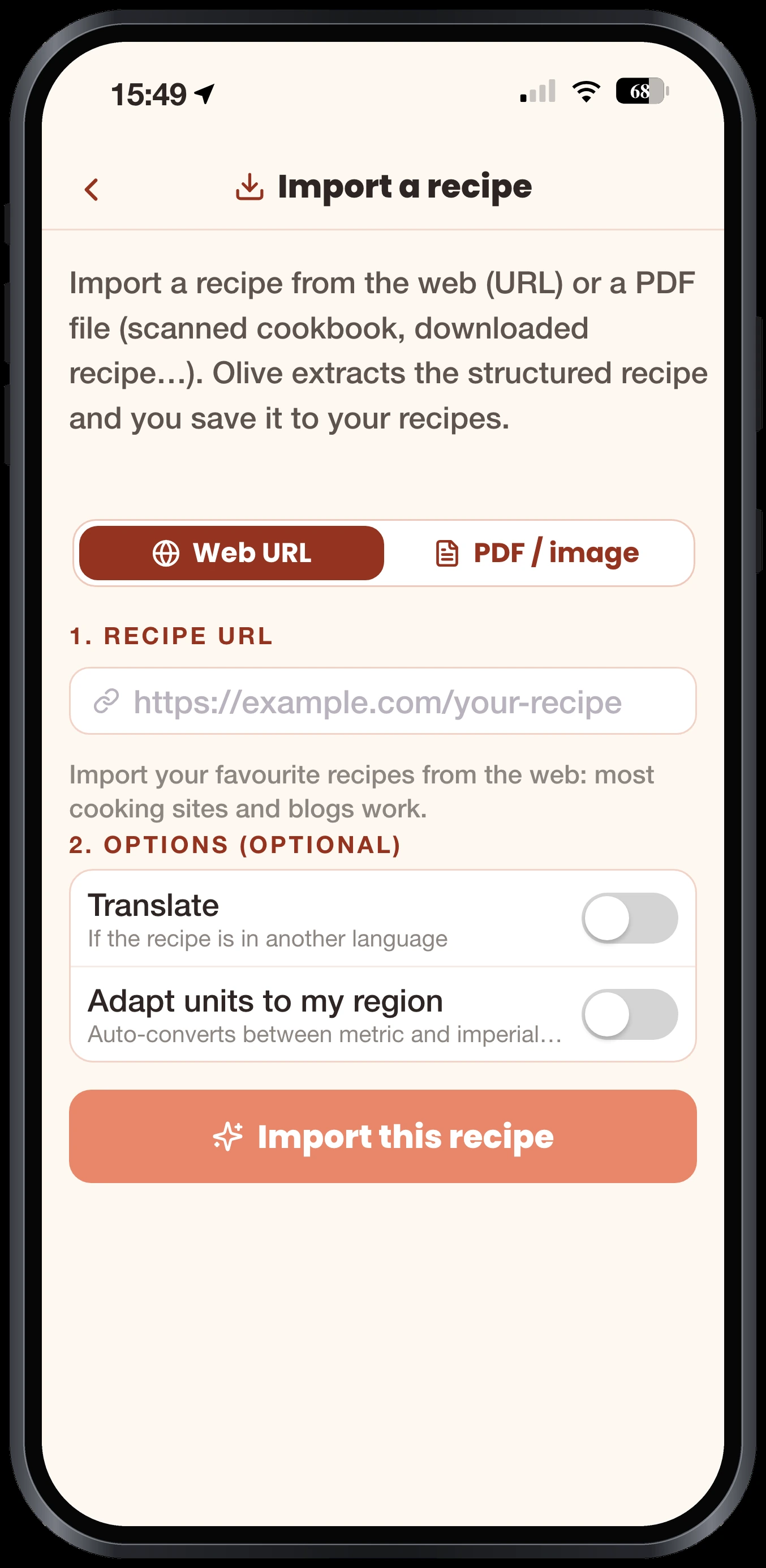
- 3. Just one recipe? Paste its address into Olivi’s URL import, or drop in a PDF: the recipe is structured in seconds, in its original language, or translated if you turn on “Translate”.
- 4. For recipes that only live inside Mealime, with no public web page, take a screenshot of the ingredients and steps and scan it: Olive reads the image and rebuilds the recipe.
- 5. Got recipes written down elsewhere as text? Paste them all into the import for several recipes: Olivi splits them and saves them one by one.
- 6. Fill in your profile (allergies, diet, time available, equipment) and ask Olive for your first week. The grocery list follows automatically.
Why a Canadian alternative matters
Beyond hometown pride, there are practical reasons. Your data stays in Canada, on a platform deployed in the Montréal region and built with Quebec’s Law 25 and the GDPR in mind. Recipes and products reflect what you actually find at the store, in your own language and units, from Canadian classics to world cuisine. And the app is built by a small independent team, not by a grocery group that can decide overnight to close the service and bring you back into its own stores.
If you used Mealime for its simplicity, you will find the same promise in Olivi: quick dinners, a plan that makes itself and a list ready before you even think about it. You can use Olivi without downloading anything, straight from your browser, then install the iPhone or Android app whenever you like: your plan and recipes follow you from one device to the next.
Frequently asked questions
When is Mealime shutting down?
The app closes for good on October 21, 2026, according to the announcement on its website. You can keep using the app until that date, and personal data is erased when it closes.
Is Mealime still in business?
Yes, until October 21, 2026. The app keeps working normally until then. After that it is discontinued and personal data is deleted.
Why is Mealime shutting down?
Since 2021, Mealime has been owned by the American grocery group Albertsons Companies. The group is bringing its recipes and planning features together in Meals Hub, which lives inside its store apps and websites.
What happens to my Mealime recipes and data?
Recipes from the Mealime catalogue stay available in Meals Hub, but your account does not transfer. All personal data is deleted at shutdown, so save anything you want to keep before October 21.
Is there a way to export Mealime recipes?
Mealime’s closing page offers no export tool. The quickest route is to paste the original addresses of your recipes into Olivi all at once, and to take screenshots of the ones that only exist inside the app.
What is the best alternative to Mealime?
Olivi is the closest match: a Canadian meal planner designed in Montréal, with an AI assistant (Olive) that generates your weekly plan, an automatic aisle-sorted grocery list and import of your own recipes. It works on the web, iPhone and Android.
Can I transfer my recipes from Mealime to Olivi?
Mealime has no export, but you can import your favourite recipes into Olivi by pasting their web address, scanning a screenshot, or pasting several recipes as text at once. Do it before October 21, 2026, when Mealime data is erased.
Is Meals Hub a good replacement for Mealime?
Meals Hub lives inside the store apps and websites of Albertsons Companies, an American grocery group. Mealime says it works even without one of its stores nearby, but you go through a grocery chain’s account and start your preferences over. If you shop outside the United States, Olivi is a more natural replacement: independent of any grocery chain, in your language, with your own recipes.
Can Olivi turn a TikTok video into a recipe?
Yes. Paste the link to a TikTok or YouTube video, or share it straight to Olivi from the app, and you get a recipe card with the ingredients, steps, photo and creator. When the caption is not enough, Olive watches the video, so check the quantities before saving.
Related articles
Where to next
Let Olive plan your week
Olivi builds your menu and generates your grocery list automatically, sorted by aisle. Free forever plan, no credit card.
Try Olivi for freeAlso worth reading: Olivi is on the App Store: the recipe and meal planner app for iPhone, iPhone Duo and iPad · Hanukkah food for all eight nights: latkes made ahead, a brisket that waits, and one big family dinner