
By Benoit Descary · June 18, 2026 · Guide
Scan your recipes: from paper to your phone in seconds
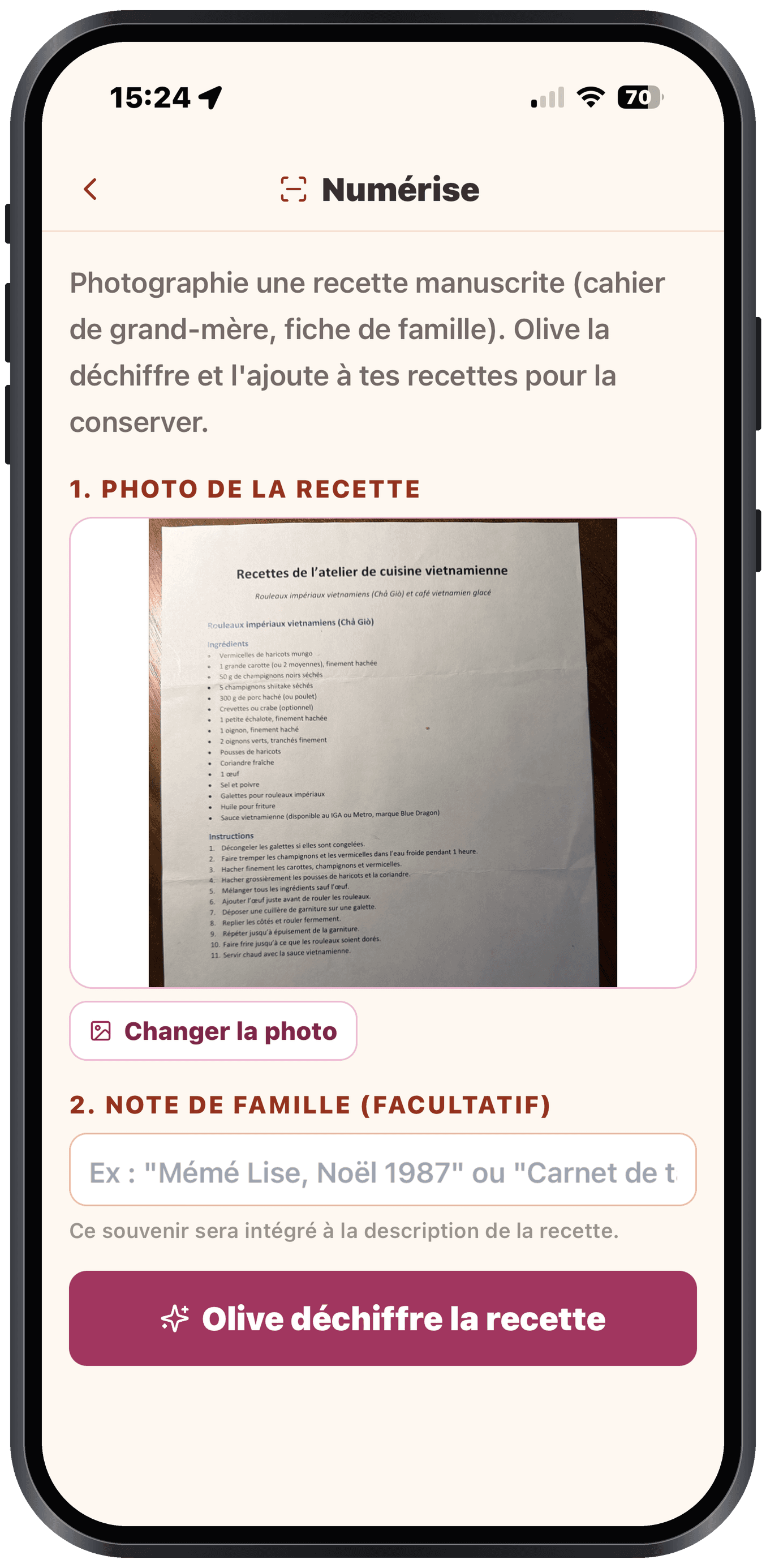
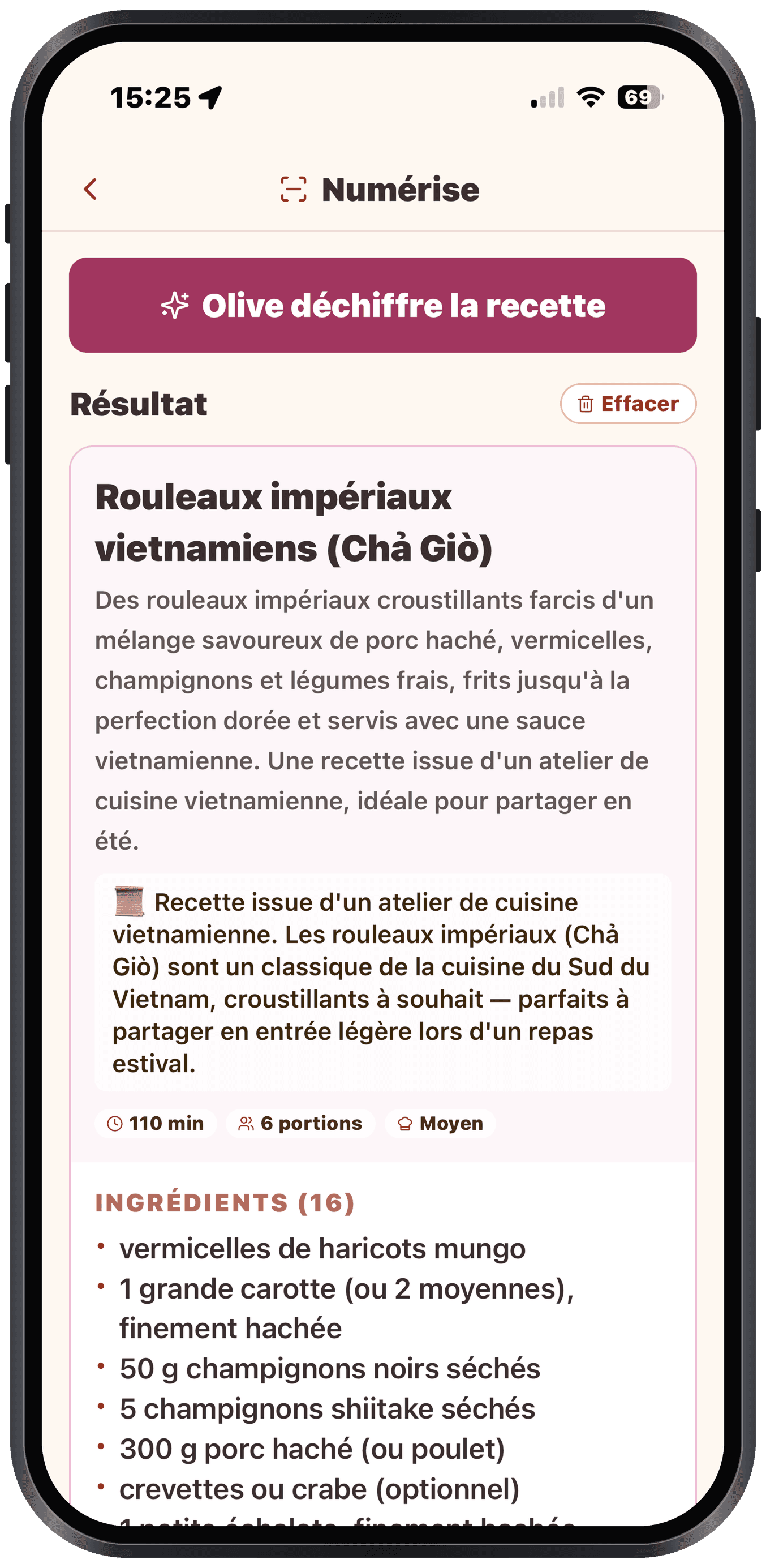
To scan a recipe, you simply photograph it in Olivi: Olive reads the page, even handwriting, and turns it into a structured recipe (title, ingredients, steps) in seconds. You have nothing to retype. On iPhone (iOS), you use the camera right inside the app; on the web, you import the image or the PDF. That is what makes Olivi a true cooking recipe software: your family recipe book goes digital, ready to plan and cook.
Key takeaways
- You photograph a recipe and Olive turns it into a structured recipe, with nothing to retype.
- Even handwritten recipes (grandma’s cursive) are recognized.
- The scanned recipe is added to your collection, ready to plan and turn into a grocery list.
How to scan a recipe
The principle is simple: you open Olivi, you choose "Scan", and you photograph the recipe, a book page, a magazine clipping, a printed card or the family’s old recipe notebook. Olive analyzes the image and automatically puts the title, the ingredient list and the steps in the right place.
On iPhone (iOS), the app uses the camera directly, which makes the action instant. On the web, you import a photo or a PDF instead. In both cases, the result is the same: a clean, structured recipe, in seconds.
Even grandma’s handwritten recipes
This is often where other recipe apps stall: a recipe written by hand, in faded ink, on a card stained with sauce. Olive also recognizes cursive and handwriting, not just printed text.
In practice, that means the family recipe book you keep so carefully can finally go digital: without spending hours copying everything over. You preserve the recipes that matter before the paper wears out.
A scanned recipe becomes truly usable
Scanning is not just taking a photo and filing it away in a folder. Once the recipe is in Olivi, it is added to your collection just like the hundreds of recipes in the catalogue. You can edit it, add it to your weekly plan, and it automatically feeds your grocery list, sorted by aisle.
That is the whole point of a digital recipe book built into a meal planner: your paper recipes join the same place as your menu and your shopping.
Why good cooking recipe software changes the game
Most of us have recipes scattered around: a book here, a screenshot there, a card in a drawer. Cooking recipe software like Olivi gathers everything in one place, viewable from your phone, and above all connected to planning and shopping.
Scanning is the gateway: it lets you import what you already have on paper, instead of starting from scratch. You build your personal recipe library in a few minutes.
Looking for software to digitize handwritten recipes?
If you are searching for software to digitize handwritten recipes, you don’t need a scanner or complicated OCR software: an app on your phone is enough. Olivi is available on iPhone (App Store) and on Android (Google Play), and scanning happens right from the camera: photograph the page — a family notebook, a yellowed card, cursive handwriting — and Olive, the AI assistant, turns it into a structured recipe (title, ingredients, steps). Unlike classic OCR that spits out raw text to clean up, the result is instantly usable: the recipe joins your collection, slots into your weekly plan and feeds your grocery list. Everything syncs with the web, where you can also import recipes from a URL or a PDF.
Frequently asked questions
Can I scan a handwritten recipe?
Yes. Olive recognizes handwriting, including cursive. So you can scan a recipe from a family notebook, not just a printed page. The result is a structured recipe you can reread and adjust as needed.
What devices does scanning work on?
On iPhone (iOS), you photograph the recipe directly in the Olivi app. On the web, you import an image or a PDF of the recipe. In both cases, Olive turns it into a structured recipe.
Do I have to retype the recipe after photographing it?
No. Olive automatically structures the title, ingredients and steps. You have nothing to copy over; you can simply check the result and fix a detail if you want.
What can I do with a recipe once it is scanned?
The recipe is added to your collection, ready to be added to your weekly plan. It then automatically feeds your grocery list, sorted by aisle and shareable with someone close.
What software should I use to digitize a whole recipe notebook?
A mobile app with AI recognition beats generic scanning software. With Olivi (iPhone and Android), you photograph the pages one by one: each recipe is recognized, structured and filed in your collection. No image files to manage, no text to retype — and the original notebook stays safe in its drawer.
Does recipe scanning work on Android?
Yes. The Olivi app is available on Android (Google Play, currently in beta) as well as iPhone: photo scanning, recipes, weekly plan and grocery list all sync with your web account.
Related articles
Where to next
Let Olive plan your week
Olivi builds your menu and generates your grocery list automatically, sorted by aisle. Free trial, no credit card.
Try Olivi for freeAlso worth reading: Copy Me That Alternative: What It Does Well, and What Olivi Adds · High-Protein Meal Plan: a Week Built From Real Numbers